Zwift Academy Workout Mode

In case you were wondering where the update was for last week, I came down with another head cold and took some time off the bike. Now I'm back into workouts and ramping up the training.

I was interested in the Zwift Academy workouts as I had not tried workout mode it since the first time it was released more than 6 months ago. The Academy workouts are available to all Zwift users for free. See pic below where they are located in the workout mode.

You can select any route you would like to view while executing the workout as terrain, laps, sprints/KOM and power-ups are not available to you in this mode as they may affect the output of your workout.

Using my standard setup of power meter and Kickr (that simulates the terrain in game) and I selected the first workout and got stuck into it. The first thing I noticed was it was NOT using the Kickr to hold the wattage at the target range. I had no idea what I needed to select and was already into the workout. The format of the ride looked pretty easy so I just ran with those settings.

Note the "No ERG w/power meter" option at the bottom

If you change your setup when you load Zwift to not use the power meter and swap it to the Kickr/smart trainer for the power source, then the options menu for the workouts show that they are in Erg Mode and the game will adjust the resistance for you based on the prescribed interval. I am going to try this for my next workout session (see image below).

This is the Power Source/Controllable Trainer setup you need to use to get ERG mode to work

One rookie error was I forgot to turn on the fan at the start of the session (the room was still cold), so I stopped and turned it on while still in warmup task. This was fine and I passed it with my first GOLD STAR!

Settling into the intervals
Another thing to note, the colour of the progress bar at the bottom of the screen does not indicate if you are in the correct zone for the workout (eg: green does not mean you are on target), the colour indicates how close to threshold or which power zones you are exercising in. (eg: grey is recovery, blue is moderate, green is below threshold, etc) If you sit too far above/below the zone you are targeting, a message will pop up underneath the workout box in the middle of the screen to go faster of slower. This generally kicks in +/- 20watts from my limited testing.
My little avatar heading toward the epic KOM after the 1st Sprint (see red block)

If you are finding the resistance on the trainer is not at the right level to match the "road feel" or gear ratio you are expecting indoors, you can adjust this on the phone app via the Resistance UP/Down buttons. Most Kickr users have this set to around 50-70%
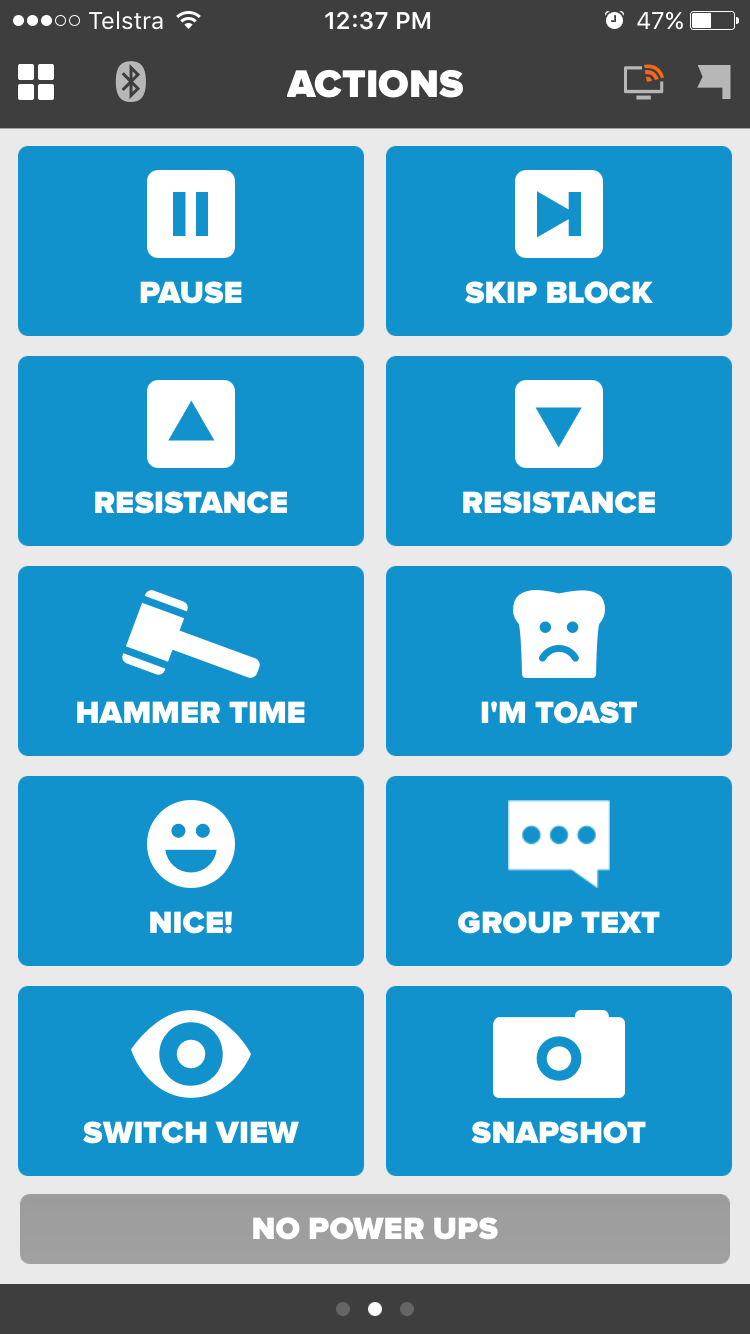
The iPhone companion app

There were a few things I would re-design in this first workout. The 5mins rests after the 5min intervals and after the sprints were redundant as they were at the same power level as the 20min steady state section. 

During the cool down you end up doing more watts than the steady state before winding down.
My avatar in workout mode - a little screen in front of their faces that other riders can see
Overall I received 5/6 STARS on the workout and was a little perplexed. When I downloaded the file to Training Peaks and analysed it, all seemed perfect. There were 2 spots where the power dropped to zero - when I turned on the fan in warmup and when I answered the front door in a rest period for 30 seconds. As I got a star for the first time I stopped, I don't think the second interruption would affect the result. The power for the 2x 5min intervals were spot on as well and only differed by ~2watts between them so hopefully there will not be any other issues with future workouts that are more complex.

Rapha Women's Ride Loop - Melbourne

Each week I try and attend a group ride outdoors that finishes up with coffee or breakfast and get some social bike time in. Often I have to squeeze in a ride before work and head straight into the office or do the remainder of my weekly sessions solo these days.


The one ride close to my home that I enjoy doing is the Rapha Women's Ride from Collingwood in Melbourne. It leaves Thursday morning at 6am from the corner of Wellington and Peel Streets.


Taking approx. 1hr 10mins it finishes up at a cafe nearby and we chat over coffee about what our cycling comrades are up to and our next adventures. I took a few ladies out this weekend to test out the course and catch up over coffee afterwards. Thanks Shel, Fats and Reese for the mornings ride!! Based on my Instagram forensics, I've been doing this ride for years, it's nice to share it out to a wider group.


We had a Zwift Academy "virtual hills" group training ride which was fun on Thursday and Shane live streamed it on Facebook over 2x 30min sessions. Shel said they saw it live and really enjoyed it. When they were out shopping for bidons, they came home with 2x Kickrs instead! I love that enthusiasm and showed them a few quick tips using the Zwift and Wahoo iPhone apps with our coffee.

The other cool thing about the Academy is that riding outdoors validates the results indoors, so it all clocks up towards your entry to the next round. Stream links below for those interested in what happens in a group workout and listening to Shane talk Zwift and indoor cycling with me popping in/out of the stream.

Zwift Academy Group Ride

Tonight was the first group ride for the Zwift Academy. The format was to ride together for 6 laps with the ride leader on the 5.1km flat Richmond course.

Lap 1 - easy pace warmup
Laps 2-5 - sprint from the 200m to go sign to the green sprint banner
Lap 6 - easy pace cool down

Logging in earlier, the game puts you in a holding pattern and when you pedal a virtual stationary trainer pops around your back wheel and you can spin to warm up. It has a BIG countdown clock and chat area to comment to others warming up and waiting for the start.


When you roll out, you pop out under the start banner on the Richmond course and then continue straight onto the circuit. In the picture below you can see the lap/distance counter in the centre of the image. The mini terrain map shows the green dot where the next sprint is.


I initially rolled out with the front bunch until the ride leader called us to wait, then dropped into the second bunch. There was not much chatter except for the ride leader calling out task cues.


The last lap cool down was great! Chatter on screen picked up and it was great to see ladies from everywhere online and participating.


My performance: It has been a long time between sprint sessions for me. I was 200w down from where I have seen my peak power before. I and found it hard to wind up and sustain. Where I kicked the sprint off from (the roundabout or closer to the intersection) didn't make much of a difference. Each sprint I did was faster than the previous so it was a great session from that perspective. It was different technique to outdoors where you would use the torque of the bike more.

What I did enjoy was the punchy and playfulness of the sprints which I have missed from my long km rides lately. So this was a good reminder to add some more into my every day rides.


Deadline to enroll - July 31st 2016. Join the Zwift Academy.

Meeting Canyon SRAM Racing and the kit!

The moment I saw the Canyon SRAM kit, I was in LOVE with it. I had no idea at that time that they were linked with Zwift, I was just looking for my husband to buy it for me!

I was in Adelaide during the Tour Down Under in January 2016 watching the Santos Women's Tour. On the rest days we went riding with the Rapha Women and Tiffany Cromwell joined us. It was great to see the kit close up and the quality. She was raving about the knicks at the time about how comfortable they were.

Tiff front and Center. Photo: Beardy
A tree down on course. Tiff shows us how to CX over it.

After another stage of the UCI tour there was a session at the Rapha Pop-up store:
CANYON//SRAM: Pro racer Tiffany Cromwell and team manager Beth Duryea will discuss the team’s goals for the year. A range of Canyon bikes will also be on display to book a test ride.

I had a nice night and some Italian food there listening to the session about what their year entails. Sounded gruelling and fun all at the same time.


I had an invite to the live session that Tiffany held in Adelaide with Zwift and they announced the Academy there. Such exciting news!! I was a little star struck being up close with Tiff and Beth, I didn't know what to say, so I just asked for a photo and let them do their thing.

Beth and Tiff being interviewed by Sophie

I got to Meet Tiff!!


Long vid of the full session and interview

Finally managed to get organised and purchase my own set of kit when it was available on the Rapha site in May...

Zwift Academy - The Initiation


There is no secret that I am a fan of women's cycling and have been racing for years. If you read back over the last few blog posts, I've been looking for something to catch my attention and would fit in around my busy work lifestyle. When I heard about the Zwift Academy, it caught my attention for sure.


It was with some trepidation that I clicked on the Enroll button for the Zwift Academy. Would I be accepted? Had I done enough riding to be fit enough to start this? What would it involve?

- Did I have the equipment setup? Yes. Kickr, fan and TV setup in the spare room.
- Do you have your accounts setup? Yes. I have connected my Strava to Zwift so it auto saves each workout and I have connected my Training Peaks account (adding in TrainSharp) to get all the detailed data.
- Did I have enough flexibility to add structured training sessions to my week? Yes. No current coach or cycling team responsibilities.
- Could I do group rides on Zwift? Yes. Assuming they fit in around the work day.


Follow my journey

To keep me accountable, I am going to put my workouts in my "Ride Calendar" above. I am tracking everything in Strava and Training Peaks, so that my rides will be available to Zwift and TrainSharp to assess. You can ride online with me for the sessions if you are in the same timezone and if you see me, give a #RideOn

I will do a weekly wrap-up of my rides for the week, how my points are tracking, and how I am coping on this blog. As always you can see my other daily updates on Instagram/Facebook/Twitter.